The questions a finance chief asks every month, answered from the ledger in one place, and the board pack that answers them for everyone else, produced, refreshed and shared without a spreadsheet in between.
Most small and mid-sized businesses run their financial oversight in a workbook that sits beside the books: a KPI tab, a covenant tab, a forecast tab, and a board deck assembled from screenshots the week of the meeting. Each is a copy, each is out of date by the time it is read, and none of them knows when a late adjusting entry has changed the numbers it quotes.
The CFO / Boardroom Center removes the copies. Every ratio, forecast and report is calculated from the same GAAP-compliant double-entry bookkeeping that produces your financial statements, so the cockpit, the covenant certificate and the board pack agree with the ledger by construction, and they can tell you when the ledger has moved since they were produced.
A single page that says whether the business is healthy, where cash will be in thirteen weeks, and whether you are on the right side of your loan terms, without waiting for month-end.
A month-end checklist that verifies itself against the books, a period lock at sign-off, and a reporting pack that builds on its run day rather than on a Sunday night.
With your own Kantivo licence you can work a client’s Center over accountant remote access, set targets, write the commentary and send the pack, all from your own desk.
Board packs and lender packages on a schedule, covenant headroom watched daily, and a compliance certificate ready when the bank asks for it.
Harbor & Pine Landscaping carries a $600,000 equipment loan from First Coastal Bank with two covenants: a debt service coverage ratio of at least 1.25× and minimum cash of $75,000, tested quarterly. Its outside CFO, Dana Ortiz, works the books from her own office over remote access.
In mid-August the Covenants tab shows DSCR at 1.34×, inside the 10% warning margin Dana set, and flags it amber six weeks before the 30 September test. She opens Scenarios, models delaying a $48,000 mower purchase to October and a 4% price rise on maintenance contracts, and sees the trailing ratio projected at 1.41× with cash never falling below $82,000. The owner approves both.
On 10 October the Quarterly Board pack generates itself. Kantivo Core AI drafts four insights; Dana edits one, deletes one and approves the rest, then writes a one-page commentary. On 14 October the bookkeeper posts a $3,900 accrual for September fuel. The pack shows that its data has changed. Dana presses Refresh, and Revision 2 opens with a page listing every figure that moved, net income falling from $212,480 to $208,580, and a Revised stamp on each page. The board’s QR code, printed on the cover of the meeting copy, already opens Revision 2. The lender receives a separate PIN-protected link to the Lender Package, which expires in 30 days.
Everything sits under a single sidebar entry, CFO / Boardroom Center. The last tab used is remembered for each person.
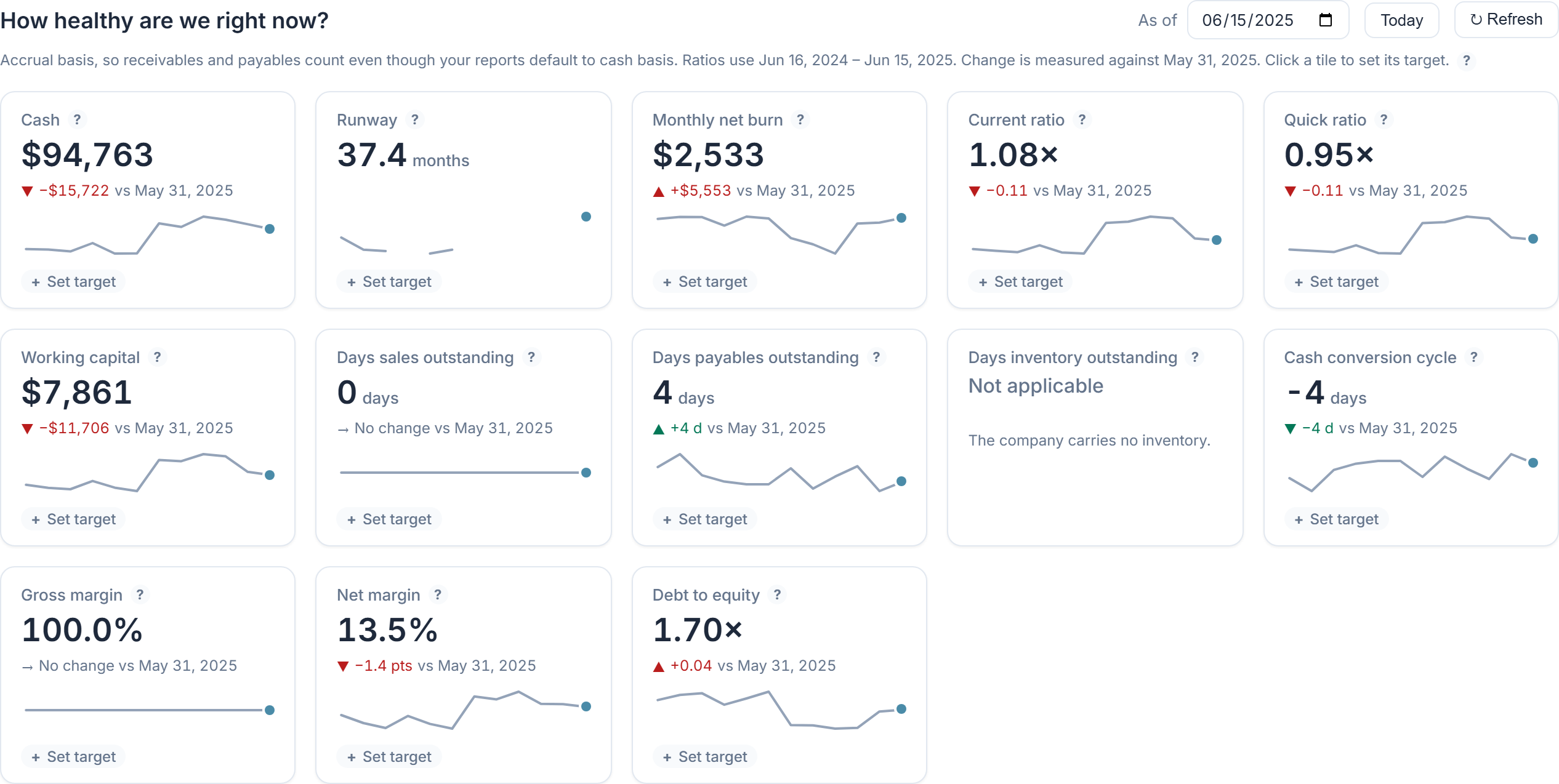
A KPI cockpit of thirteen tiles: cash, runway, monthly net burn, current ratio, quick ratio, working capital, days sales outstanding, days payables outstanding, days inventory outstanding, cash conversion cycle, gross margin, net margin and debt to equity.
The rolling thirteen-week projection, built from open receivables and payables, recurring transactions and payroll, and timed by how each customer actually pays. See Cash Flow Forecast for the method.
Named what-if cases laid over the forecast: a new hire, a price change, losing a customer, new revenue, an expense change, taking a loan, delaying payments or a one-off item. Each shows the effect on runway, the lowest cash point and profit, and cases can be compared side by side.
Variance by account against your budget, with a comment field on each variance over your threshold. The comments travel into board packs, so the explanation sits next to the number it explains.
Enter each covenant from the loan agreement and Kantivo measures it from the books.
Where the business is exposed: revenue share of the largest customers, reliance on single vendors, receivables aging with expected collections, and transactions worth a second look, such as possible duplicate bills, round-number payments, entries dated on weekends or holidays, unusually large amounts for a vendor and journal entries posted straight to control accounts.
Revenue, cost and margin by class, location, customer, product or project for any period, using the tracking you already record. Totals tie to the income statement, and the view exports to CSV.
A month-end checklist that checks itself. Tasks such as reconciling every bank and card account, clearing suspense and Undeposited Funds, and confirming every entry balances are verified against the books, with any exception listed and linked. Each task carries an owner and a due date; finishing the list offers to lock the period, and a strip shows when each month closed.
A running estimate of income tax on profit to date, set against what has been reserved and paid in estimates, with a full-year projection and quarterly due dates. It is labelled on screen as an estimate, not tax advice, and states every assumption it makes.
Board-ready report packs, described in full below.
A pack is a saved set of reports for one audience. Each run produces a dated edition that is frozen, so the figures a board was shown stay reproducible, and that can still be brought up to date when the books move.
Each edition records a fingerprint of the transactions in its period. Add, edit or delete one afterwards and the pack says that its data has changed, in red if the period had been locked. Nothing refreshes on its own; you decide when to issue a revision.
Sharing uploads a frozen, read-only copy of the pack and returns a link and a QR code that open on any phone, tablet or computer. Your company file and live data never leave your machine.
The insight drafting is Kantivo Core AI, powered by Claude from Anthropic. It is optional per pack, and insights are drafts until a person approves them.
Administrators and the owner see the whole Center. A CFO Center permission lets an administrator grant it to a controller or finance manager without full administrator rights, and staff without the permission do not see the menu item. An outside CFO or accountant with their own Kantivo licence can use the Center over accountant remote access, which pairs their installation with the client’s without consuming one of the client’s seats.
Kantivo is Windows desktop software sold as an annual subscription. The books stay on your own computer; the only thing that goes to the cloud for this feature is a pack you choose to share.
Professional and every plan above it, including Enterprise, Accountant, Nonprofit and Government. On Basic the item is visible but locked, with an upgrade prompt. See Pricing.
Yes. With their own Kantivo licence, an outside CFO or accountant can work the Center over accountant remote access. Inside the business, the CFO Center permission gives a controller access without full administrator rights.
No. Only a frozen, read-only copy of the generated pack is uploaded. Links can carry a PIN and an expiry, can be revoked at once, and keep a log of views. The viewer page is excluded from search engines.
The pack warns you. Refresh produces a new revision for the same dates with a page listing every figure that moved, and a Revised stamp on the cover and footer. The original revision is kept.
No. Kantivo Core AI insights are optional and arrive as drafts. You edit, delete or approve each one, and by default a pack cannot be shared until its insights have been reviewed.
The application needs to be open, because the books live on your computer. A run that was due while it was closed is produced the next time you start Kantivo, and you are told that it was a catch-up.
No. It is a planning estimate from your books, and the screen says so. It does not model loss carryforwards or every safe-harbour method; confirm amounts and due dates with your tax adviser.
They now live inside the Center as tabs, with the same data and settings, plus variance comments on Budget vs Actual.
Try the full product free for 30 days, including the CFO / Boardroom Center, then continue on Professional or above.